
How to Create an Instagram Landing Page
Most of us know the frustration of only being able to add one link to Instagram, especially if you’re a blogger. You want to include your blog link, but then what about your social media or a specific page on your blog you want to share with your audience? There are tools such as Linktree which allow you to create a custom landing page, but the issue is that this takes traffic away from your blog because another platform is hosting your links page. The solution? It’s actually really easy to create your own Instagram landing page on your blog, so you don’t lose any traffic.
I tried various design methods for mine, but decided that the Elementor plugin was the best tool to use. Elementor is a page design tool which uses drag and drop blocks, which makes it easy to customise pages according to your preferences.
You can only use Elementor if you have a WordPress self-hosted blog.
Getting Started
Create a new page and add a title. I just called mine Instagram Links, but whatever works for you is fine. Then click edit page with Elementor and your screen should change to Elementor editing screen.
Note: You can’t use Elementor with Microsoft Edge, so make sure you have a browser like Google Chrome available.
Creating a Blank Page
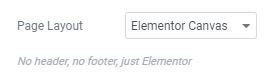
The first thing I did was go to settings and change my page layout to Elementor Canvas. This gives you a blank canvas to work with. Essentially, your landing page won’t include any headers or footers, and only the links on your landing page will be seen. Plus it looks much neater and works better on a mobile screen. As it’s for Instagram, it’s likely that viewers will access your page from the mobile app.
Personalising Your Landing Page
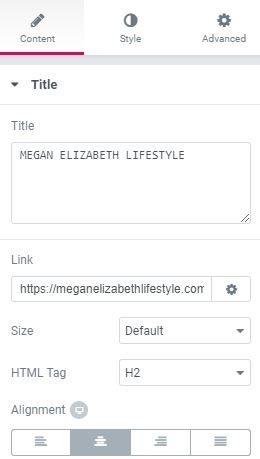
The downside of using the Elementor Canvas layout is that it gets rid of your blog header including your blog title and any logos/introduction images. This is easy to fix though. You can add a heading and image widget to the top of your page to replicate your blog header. Elementor gives you access to Google fonts so you can use the same or similar font to your blog branding. For my image, I chose to add a photo of me, rather than my site logo to make it a bit more personal.
For the title or any text on Elementor, there are different tabs when you are editing. Content is where you write everything, but if you want to change the font, colour etc. then just head to the style tab.
Buttons
The main element of landing pages are the links to your blog/social media that you want to include. But how to create those buttons that match your branding.
Luckily, Elementor also has a drag and drop button widget which makes life a lot simpler.
All you need to do is add the button label e.g. Visit the Blog and then add the link you want that button to lead to. For example, for my ‘Visit the Blog’ button, I added my homepage link. Again, to change the colour, font and general look of the buttons, just go to the style tab next to content. Elementor makes it really easy to stay on brand because you can use your custom brand colours.
It’s worth practising designing one button until you are happy with the appearance, and after that add as many buttons as you wish.

Social Icons
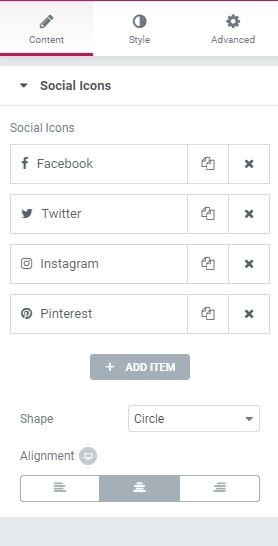
While you can still use the buttons widget for your social media, I prefer the purposely designed social icons widget as it looks neater and all your socials are on the same line. Plus, you can still have the same style as your main link buttons by editing the colours etc.
Preview Before You Publish
That’s it really! Just before you hit publish, preview your page to make sure you are happy with the formatting. There’s a little computer screen picture at the bottom of the Elementor toolbar which gives you the option to preview the page in desktop, tablet and mobile mode.
Once you’re happy with everything, you can publish and have your very own landing page. Just don’t forget to change the link in your Instagram bio to your new landing page.
If you want to see what my landing page looks in my detail, click here.
Pin for later
Any questions about this post just send them my way.
Megan x
Let’s connect on social media:
Twitter ་ Instagram ་ Facebook ་ Pinterest





omg I never knew about this!? When I find a moment I am defo gonna have to make one of these and I love that it is a way to ensure you still get that blog traffic! Thanks Megan!
It’s so easy to do x
This is such a useful post! I never really thought about how the use of Linktree takes traffic away.
I will definitely be giving this a go and make my own landing page. Love the look of yours!
Thanks for sharing!
Aimsy xoxo
https://www.aimsysantics.co.uk
Let me know if you make one, I’d love to see the results x
I never knew you could do this! Thanks for the fab tips Megan ?
Emma | http://www.lifeofemmax.co.uk
Glad it helped! X
Woah, I did not know you could do this! This is so helpful for bloggers – especially for those of us under 10k who can’t add the ‘swipe up’ feature to link to our blog! Thanks so much for sharing – it’s now on my blog to-do list!
Would love to see the finished result! Yeah not having the swipe up feature is annoying!
Hey Megan ?
Thanks for the tutorial! I don’t have WP so i have used Linktree to expand my links on Instagram lol ?
I didn’t know about that until recently tho! I hope others find this post useful hun! Xoxo
Aw what platform do you use? I’m sure there are other ways of making a page on other platforms x
Omg this is such a clever idea! I can’t believe I’ve never thought of it before haha! Always struggle picking one link for my bio (especially cause I’ve not got the swipe up feature in my story yet) – thanks for sharing!
It’s easy to do and means you don’t have to choose one link! X
I definitely need to create something for my Instagram bio since it doesn’t let me use my blog link!
Oh no! I don’t know why that would be!
I have been considering doing something like this for a little while now and after doing a bit of work with elementor on other sites I definitely see how it would work very well!
It’s worth a try x
This blog post just told me to migrate to WordPress so I can take advantage of these customisations features that I’m not currently getting on blogger
Fran | http://www.franciscarockey.co.uk
Yes definitely get WordPress!
The idea of having an insta landing page never really occured with me. In fact I didn’t know it was a thing for self-hosted blogs till reading this very post. Now learning more about it and how to create one I’ll defo be considering it for my own blog. Cheers for sharing Megan!
Johnny | Johnny’s Traventures
https://johnnystraventures.com
So happy you liked it. Would love to see the finished result!
OMG I never knew about this!?!
I will definitely look into this! Thanks for this amazing tips Megan! Xo
This is so helpful for Instagram! I didn’t even know about this and this will be so helpful to Instagram accounts without 10k followers, thankyou for sharing x
Kayleigh Zara ? http://www.kayleighzaraa.com
Thank you, I had been wondering how people did this. As a blogger instagram can be a little annoying as it is all about the visual and I feel people may not be bothered to click through site. This may help! Found your site through twitter Sunday blog swap.
It’s worth trying it and seeing what happens x
I had no idea there was a landing page for Instagram. I guess it’s true, you do learn something new every day. I am going to have to look into setting mine up now that I know it’s a thing and how to do it.
This is going to be such a helpful guide for so many bloggers!
Isobel x
New post: https://www.fashionistachic.co.uk/2019/06/fashion-how-to-find-best-bargains.html?m=1
Insta: https://www.instagram.com/isobelceline/
New video: https://youtu.be/zotkVoPBSHc
I really enjoyed reading this, it was so helpful! X
Yay, glad it helped! X